
Release Version: 19.0.44961
New features in this version of Moovila are as follows:
- Risk Register:
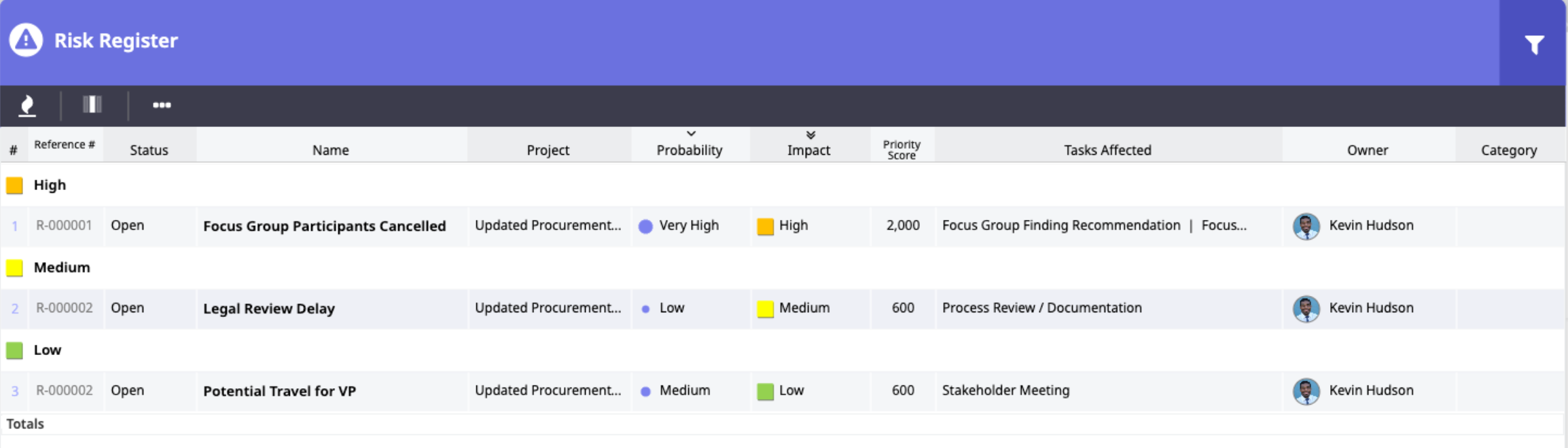
The Risk Register allows users to track the status, probability, and impact of risks within projects within a Power Grid format. This means that any time a red flag goes up it can be accounted for here for proper assessment and monitoring—thereby increasing the likelihood of risk remediation.- Available as a panel in dashboards at the project and project portfolio levels.
- Visibility can be set on risks so that they are seen by project owners + team leaders, internal team members only, or by all team members.
- Chat channels allow for risk discussion.
- Priority scores related to the risk are automatically calculated using the probability and impact values.
-
Enhanced Project Budget Functionality:
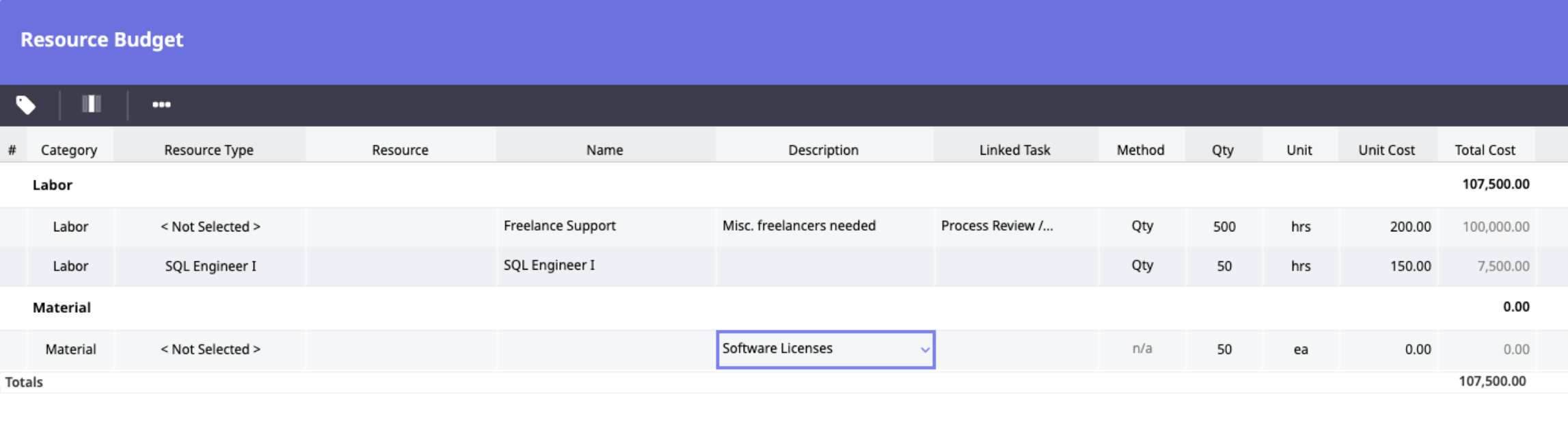
Moovila’s budgeting functionality now allows for budgets to be entered at a granular, task level complete with resource allocation OR as project level “buckets.” As details become solidified, the budget can be shifted to a more detailed format, if desired.- Resources types and/or specific resources may be added to budgets.
- % Allocation field available for tracking the percentage of commitment that a resource would have on a project.
- Addition of Customer Relationship Management Columns (for users with CRM license):
Read-only columns have been added into Opportunity management from Salesforce (paving the way for additional CRM platform integrations coming soon) for:- Source-Will display CRM or Manual Entry
- CRM Stage Name- will be the CRM Stage (currently will be Salesforce only Stage)
- CRM Customer Name- Account name from CRM for the Opportunity
-
CRM Owner- Sales owner for the opportunity as attached in the CRM
- Permissions Updates:
The following new permissions have been added to Moovila:- Customer Permission is now available across roles
- Risk Register Admin-8000
-
Risk Register-8100
-
Resource Budgeting-7900
- Filter Additions:
- "Created By" and "Cost Code" filters are now available for filtering projects and tasks.
- Teams filter is now performing as intended across the platform.
- Time cards may now be filtered using static date ranges for effective date, changed date, or created date.
- Independent default filter settings may now be established for journal entry, submit, approve, and General Power Grid.
-
Performance Enhancements:
- Updates have been made to improve performance when copying projects
Comments
0 comments